Hybrid Architecture
QAIL bridges the gap between relational data (PostgreSQL) and vector search (Qdrant) using a robust Outbox Pattern.
Overview
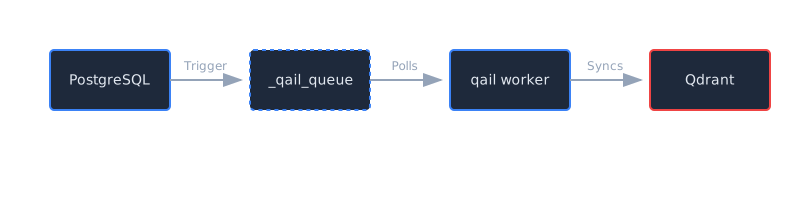
Instead of dual-writing to both databases (which is prone to inconsistencies), QAIL uses a transactional outbox approach:
- Transactional Write: You write to your PostgreSQL tables.
- Auto-Trigger: A database trigger captures the change and writes a “sync event” to the
_qail_queuetable in the same transaction. - Async Worker: The
qail workerdaemon polls the queue and reliably syncs data to Qdrant.
Setup
1. Initialize Hybrid Project
qail init
# Select "3. Hybrid (PostgreSQL + Qdrant)" when prompted
This creates a migrations/001_qail_queue.up.qail file defining the _qail_queue table.
2. Configure Sync Rules
Define which tables should sync to Qdrant in qail.toml:
[[sync]]
source_table = "products"           # Table to watch
trigger_column = "description"      # Only sync if this column changes (optional optimization)
target_collection = "products_search" # Qdrant collection name
embedding_model = "candle:bert-base"  # (Coming soon)
3. Generate Triggers
Run the command to generate PostgreSQL triggers based on your rules:
qail sync generate
# Creates migrations/002_qail_sync_triggers.up.qail
This generates triggers that:
- INSERT: Adds
UPSERTevent to queue. - UPDATE: Adds
UPSERTevent (only iftrigger_columnchanged). - DELETE: Adds
DELETEevent to queue.
4. Apply Migrations
Apply the migration files to your database:
qail migrate apply
5. Start Worker
Start the background worker to process the queue:
qail worker
Resilience
The qail worker is designed for production reliability:
- At-Least-Once Delivery: Events are only removed from the queue after successful sync to Qdrant.
- Circuit Breaker: If Qdrant goes down, the worker pauses and retries with exponential backoff (up to 30s).
- Per-Item Error Handling: A single reduced item won’t crash the worker; it will be marked with an error and retried later.
- Batch Processing: Updates are sent to Qdrant in batches for high throughput.
The _qail_queue Table
| Column | Type | Description |
|---|---|---|
id | SERIAL | Sequence ID for ordering |
ref_table | TEXT | Source table name |
ref_id | TEXT | Primary key of the source row |
operation | TEXT | UPSERT or DELETE |
payload | JSONB | Full row data (snapshot) |
status | TEXT | pending, processing, failed |
retry_count | INT | Number of failed attempts |
error_message | TEXT | Last error message |